
Blog
Tips & Tricks
Overflow in Framer: The Setting That Silently Breaks Sticky

Ryan Hayward
Overflow is one of those things that's easy to overlook until it causes a bug you can't explain. Here's how it works and what to watch out for.
This is one of the lessons we added to the Ultimate Framer Masterclass - here's how it works.
Step 1 - Find the overflow setting
Select any frame on the canvas
In the properties panel, scroll to Styles
Look for the Overflow dropdown
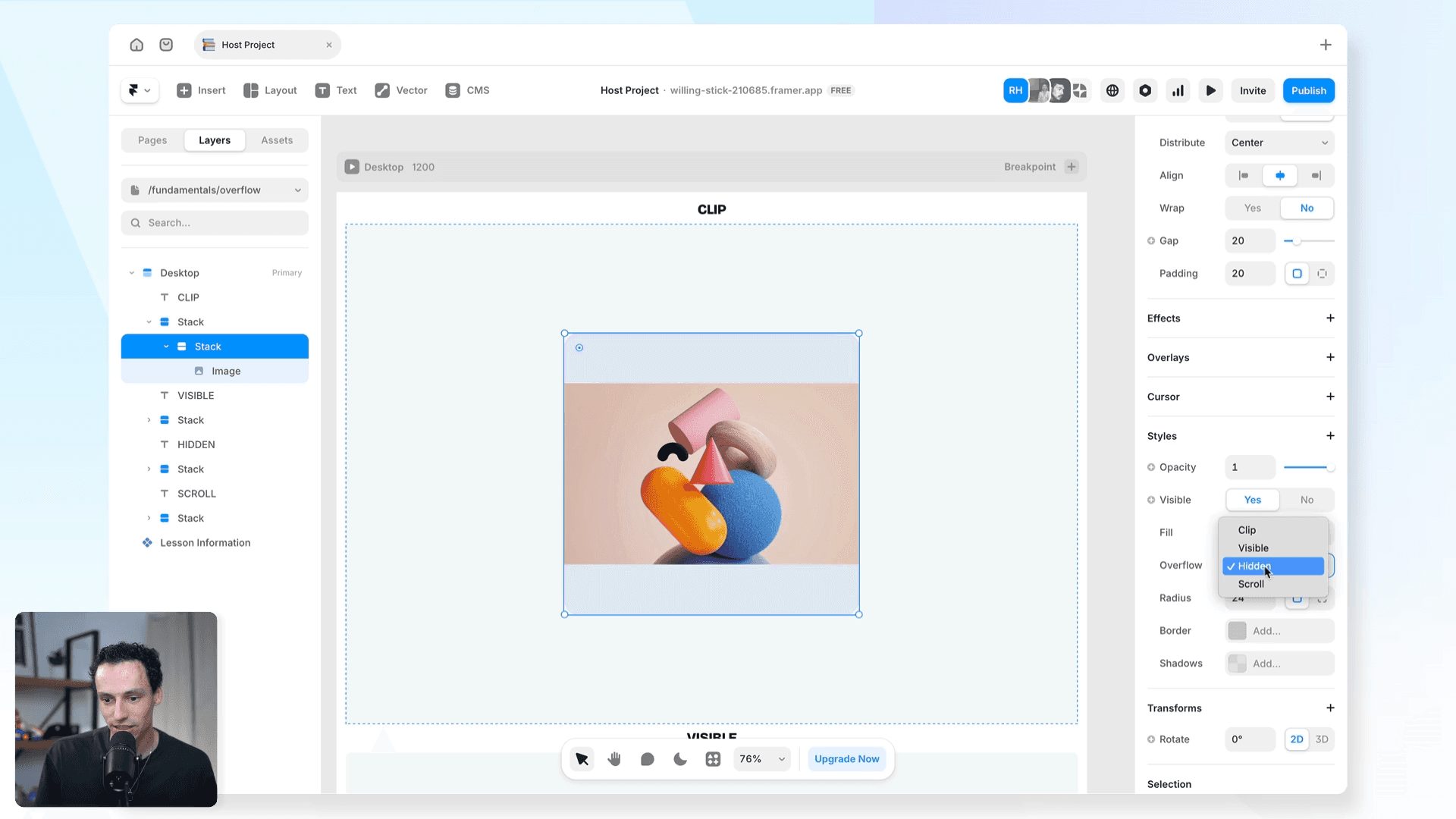
Step 2 - Understand the four types
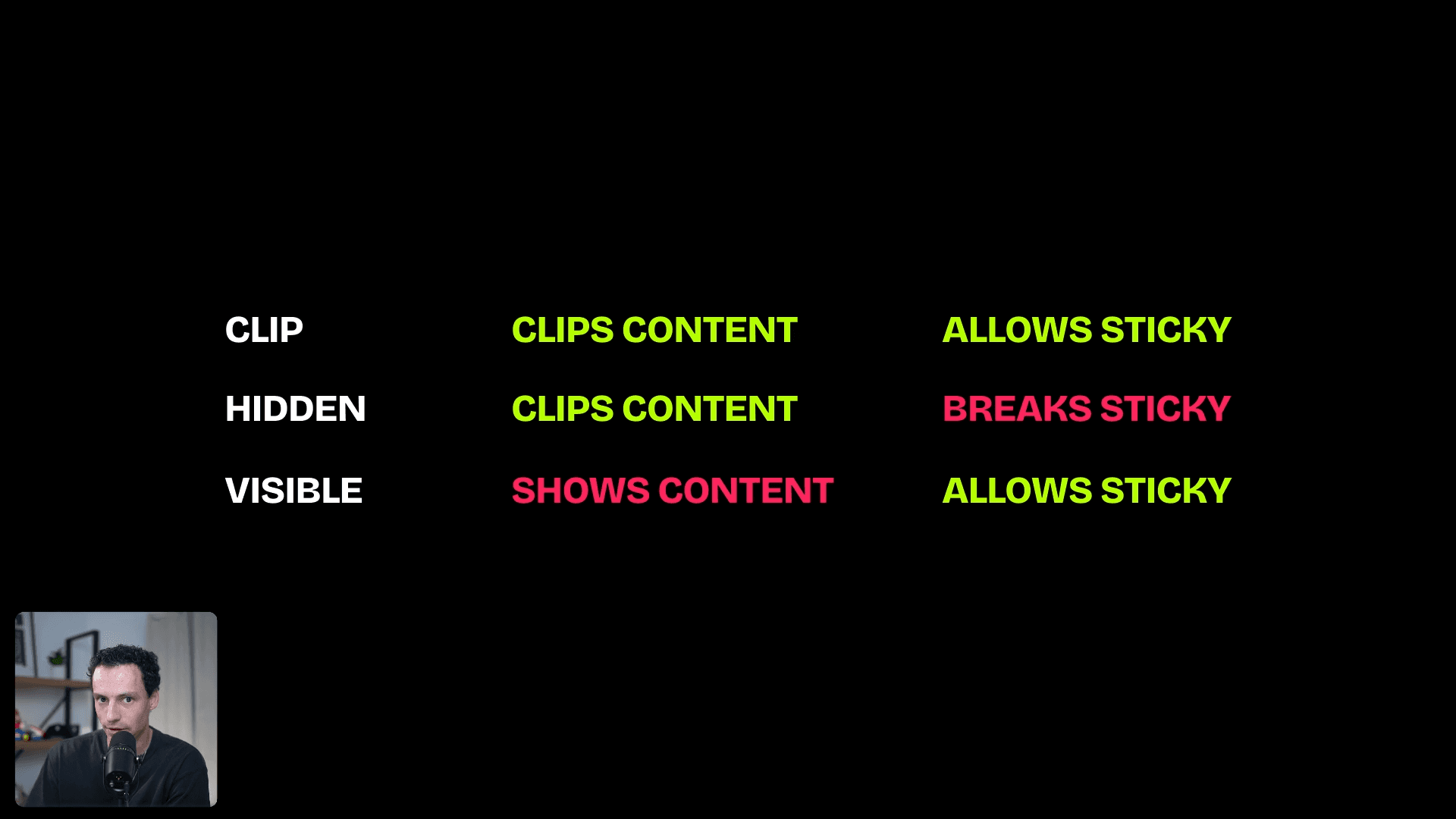
Clip - the default. Cuts off content at the frame boundary. Works with sticky positioning.
Visible - content extends beyond the frame and stays visible.
Hidden - hides all overflowing content. Looks like Clip but behaves differently.
Scroll - keeps content inside the frame but makes it scrollable.
Step 3 - Avoid the hidden overflow trap
Hidden overflow breaks sticky positioning on any child element inside that frame
If your sticky nav stops working, check every parent frame in the layer tree
A single parent set to Hidden will break sticky on everything inside it
Clip does not have this problem
Step 4 - Debug a broken sticky element
Select the sticky element and hold Cmd, clicking each parent frame going up the tree
Check the overflow setting on each one
Change any Hidden to Clip and preview the page
Frequently asked questions
My sticky nav stopped working. What's wrong?
Check the overflow setting on every parent frame. A parent set to Hidden overflow will break sticky on any child inside it. Change Hidden to Clip.
What's the difference between Clip and Hidden?
They look the same but Hidden hides content from the browser entirely, breaking sticky positioning. Clip just crops it visually. Use Clip in almost all cases.
When should I use Scroll overflow?
When you want content to overflow but still be accessible - like a horizontal image gallery or a scrollable list inside a fixed-height container.
Does overflow affect effects like Ticker?
Yes. The Ticker effect relies on content overflowing the frame, so Visible overflow is needed there. If you clip it, the effect won't work.
How do I learn Framer?
Honestly, the best place to start is just right inside Framer - keep building stuff. If you want a structured path from zero to client-ready sites, that's what we built the Ultimate Framer Masterclass for. 100+ lessons, updated as Framer evolves.
KEEP READING

AI won't take your design job. The designer next to you will.
The gap between what you design and what actually ships has been the defining frustration of this job. It closed this year, and most designers haven't noticed yet.
Ryan Hayward

Everything we announced at the Framer CMS Launch Event
The Framer CMS Launch Event by Insert Frame

Georgia Back
How to Build a Pricing Calculator in Framer (No Code)
A step-by-step guide to building a live pricing calculator in Framer using FramerForms, plus real examples of what you can build with calculators and quizzes.
Georgia Back


